
Backup Your Mobile2.3.43 - Google Play
You'll be able to see results in few seconds.
Publisher Description


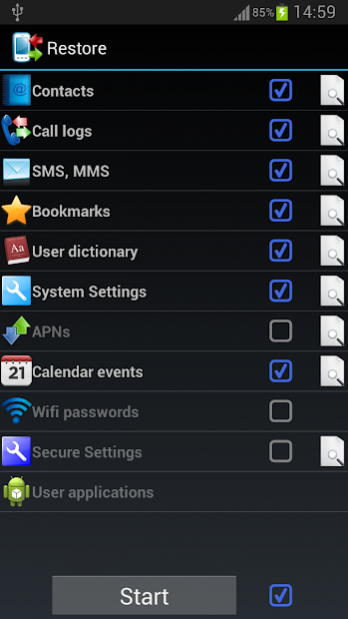

Application can backup and restore: Contacts, SMSes, MMSes, Call logs, System settings, Secure system settings, Wifi passwords, User dictionary, APNs, Calendar events, User applications, Bookmarks and browser history.
Backups are stored on SD card or in device memory, it is also possible to store data on Google Drive, Dropbox or OneDrive (SkyDrive), Yandex disk.
It is possible to schedule automatic backups. Application can automatically upload backups to Google Drive, Dropbox or OneDrive (SkyDrive), Yandex disk.
It is possible to copy data from one device to another by uploading and downloading backups to/from Google Drive, Dropbox, OneDrive, Yandex disk by moving SD card from one device to another or by copying BackpYourMobile folder between devices.
Important information:
1) After installing the appl please read FAQ (in app menu)
2) In case of any problems after contacts restore please check Contacts Display options.
3) System settings and secure system settings should be restored on the same android version and the same device.
If you restore settings on different android version or different device, some settings will not be restored.
4) APNs visibility depends on mobile network, restored APNs from other mobile network will not be visible in settings.
5) Wifi passwords and secure system settings requires root and are in experimental phase, please send me information do they work on your devices. I suggest take backup with another app.
6) Wifi passwords - before restore on clean system Wifi must be turn on and turn off.
7) Messages send by 'Google Error Report' are anonymous, it is impossible to reply.
Follow app on Google plus: https://plus.google.com/113182236204606904722/about
Follow me on Twitter https://twitter.com/ArturJot1
Please contact me if you'd like to translate the app to your language.
Detailed functions.
Backup and restore of:
- Contact
- SMS (text message)
- MMS (multimedia message)
- Call log
- Bookmark (stock browser)
- Browser History (stock browser)
- System Setting
- User Dictionary
- APN (Access Point Name) restore don’t work on Android 4.x, neither backup nor restore work on Android 4.2, because Google changed security policy, it is possible to enable experimental workaround for rooted devices in advanced menu.
- Calendar events - events only, calendar must be created by android synchronization
- Secure system settings - restore works on rooted devices only.
- Wifi passwords - works on rooted devices only.
- User applications
- Applications data (root only)
Backups can be encrypted with strong AES 256 encryption method.
Storage backups online (internet) to Google Drive, Dropbox or OneDrive (SkyDrive), Yandex disk
About Backup Your Mobile
The company that develops Backup Your Mobile is Artur Jaszczyk. The latest version released by its developer is 2.3.43.
To install Backup Your Mobile on your Android device, just click the green Continue To App button above to start the installation process. The app is listed on our website since 2021-05-01 and was downloaded 0 times. We have already checked if the download link is safe, however for your own protection we recommend that you scan the downloaded app with your antivirus. Your antivirus may detect the Backup Your Mobile as malware as malware if the download link to com.backupyourmobile is broken.
How to install Backup Your Mobile on your Android device:
- Click on the Continue To App button on our website. This will redirect you to Google Play.
- Once the Backup Your Mobile is shown in the Google Play listing of your Android device, you can start its download and installation. Tap on the Install button located below the search bar and to the right of the app icon.
- A pop-up window with the permissions required by Backup Your Mobile will be shown. Click on Accept to continue the process.
- Backup Your Mobile will be downloaded onto your device, displaying a progress. Once the download completes, the installation will start and you'll get a notification after the installation is finished.
Program Details
System requirements
Download information
Pricing
Version History
version 2.3.43
posted on 2021-05-01
Bugfixes
version 2.3.42
posted on 2021-04-18
Paged backups list.
version 2.3.39
posted on 2020-11-13
Componetns upgrade to Android 10
version 2.3.38
posted on 2020-03-18
Clone - easy transfer data from one device to another
version 2.3.36
posted on 2020-02-24
Improvements and bug fixes.
version 2.3.32
posted on 2020-01-25
Backup splited to smaller parts in case of big number of MMSes.
Added more first run instructions.
Bug fixes.
Added Google Firebase Crashlytics - tool which helps analyze errors.
version 2.3.29
posted on 2020-01-02
Re-designed backup progres view, calendar problems fixes
version 2.3.27
posted on 2019-11-30
Faster app start, changed auto backup scheduling (rescheduling might be required)
version 2.3.25
posted on 2019-10-31
Fix for crash on Marshmallow
version 2.3.22
posted on 2019-10-27
Yandex disk added.
Disclaimer
Official Google Play Link
We do not host Backup Your Mobile on our servers. We did not scan it for viruses, adware, spyware or other type of malware. This app is hosted by Google and passed their terms and conditions to be listed there. We recommend caution when installing it.
The Google Play link for Backup Your Mobile is provided to you by apps112.com without any warranties, representations or guarantees of any kind, so access it at your own risk.
If you have questions regarding this particular app contact the publisher directly. For questions about the functionalities of apps112.com contact us.
